certs-manager
This script provides an easy way to generate a Certificate Authority (CA) certificate, create Certificate Signing Requests (CSR), and sign certificates using your CA.
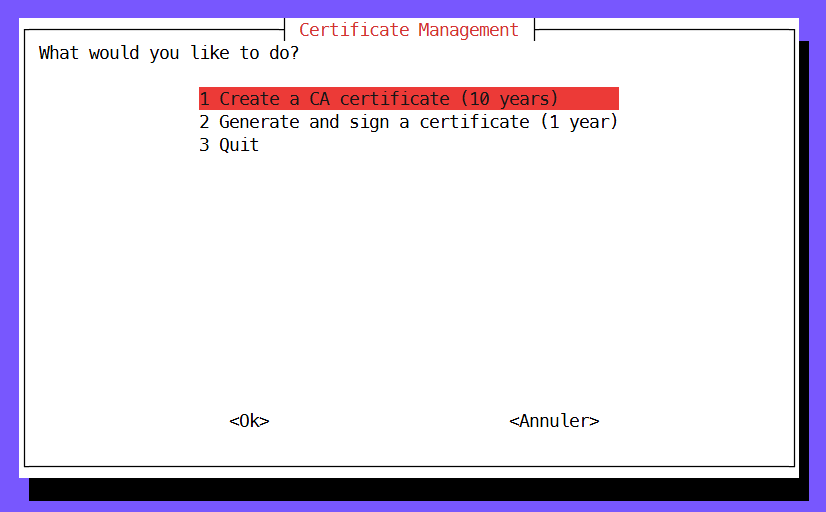
cert_manager.sh is a Bash script designed to simplify the process of creating, managing, and signing SSL/TLS certificates. This script provides an easy way to generate a Certificate Authority (CA) certificate, create Certificate Signing Requests (CSR), and sign certificates using your CA.
Features
- Create a CA Certificate: Generate a Certificate Authority (CA) certificate with a custom name. The CA certificate will be valid for 10 years.
- Generate and Sign Certificates: Automatically generate a Certificate Signing Request (CSR) and sign it using an existing CA certificate. The signed certificate will be valid for 1 year.
- Error Handling: The script includes robust error checking to prevent overwriting existing certificates or CSRs.
Prerequisites
To use this script, you need:
- A Unix-like operating system (Linux, macOS, etc.).
- OpenSSL installed on your system (the
opensslcommand should be available).
Usage
-
Download the script:
wget https://path_to_your_script/cert_manager.shOr clone the repository:
git clone https://github.com/jturazzi/certs-manager.git -
Make the script executable:
chmod +x cert_manager.sh -
Run the script:
./cert_manager.shYou will be prompted to choose the action you want to perform via a menu.
Menu Options
- Create a CA Certificate (10 years):
- Enter a directory name for storing the CA certificate and a custom name for the CA.
- The script will generate a new CA certificate and save it in the specified directory.
- Generate and Sign a Certificate (1 year):
- Enter the CA directory name, the directory name for the CSR, a custom name for the CSR, and optionally, a list of domain names and IP addresses.
- The script will generate a CSR, sign it using the specified CA, and create a new certificate in the indicated directory.
- Quit:
- Exit the script.
Example
-
Creating a CA Certificate:
If you choose to create a CA certificate, you will be asked for:
- Directory name (e.g.,
myCA) - Custom CA name (e.g.,
MyCompanyCA)
The script will create a CA certificate in the
myCAdirectory. - Directory name (e.g.,
-
Generating and Signing a Certificate:
If you choose to generate and sign a certificate, you will need to provide:
- CA directory name (e.g.,
myCA) - CSR directory name (e.g.,
myCert) - Custom CSR name (e.g.,
MyWebsite) - (Optional) Domain names (e.g.,
example.com,www.example.com) - (Optional) IP addresses (e.g.,
192.168.1.1,192.168.1.2)
The script will generate a CSR and sign it, resulting in a new certificate in the
myCertdirectory. - CA directory name (e.g.,
Notes
- The script assumes that the directory structure will be organized, with separate directories for each CA and CSR.
- Ensure that the names provided do not conflict with existing directories or files to avoid errors.
License
This project is licensed under the MIT License - see the LICENSE file for details.